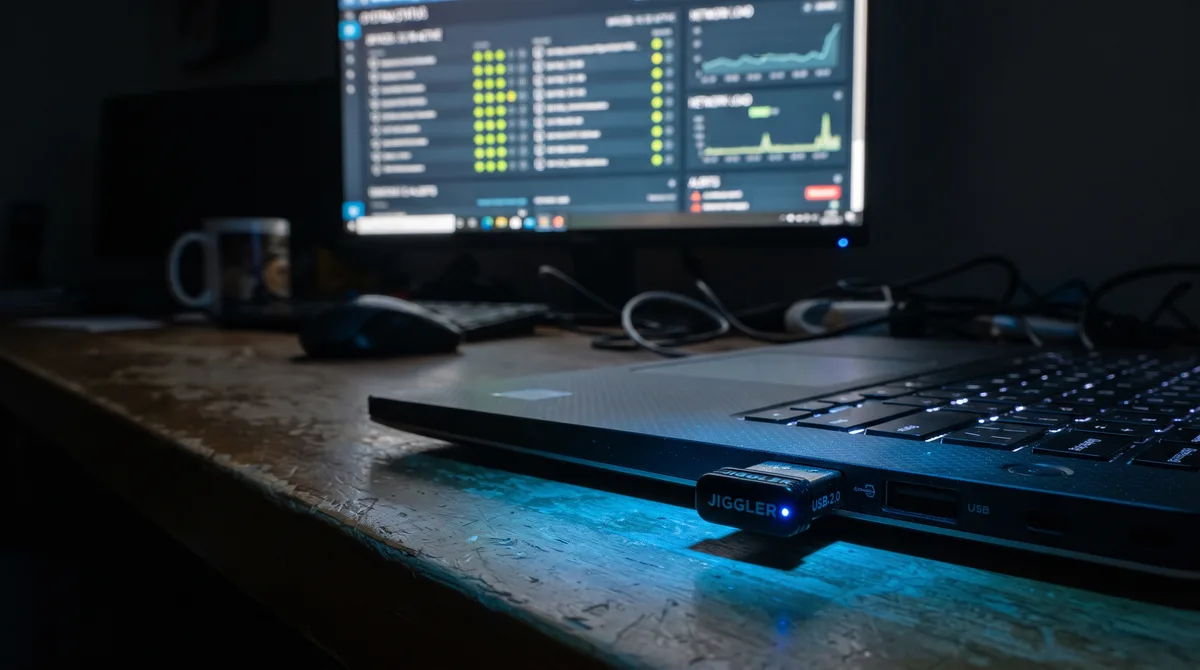
Can They Actually Be Detected?
Yes. USB mouse jigglers can be detected, and more easily than most people assume. The irony is that the "undetectable USB dongle" sold as invisible is actually the easiest kind of jiggler to trace, because the moment you plug it in, your computer records that a new device connected. That record does not disappear when you unplug it.
That said, "detectable" is not the same as "detected." On an unmanaged personal machine, nobody is looking, so nothing gets caught. On a company-managed laptop with endpoint software, the evidence sits in logs whether or not anyone reviews them today. And the detection question isn't limited to USB hardware. Software jigglers and mechanical mouse movers each leave their own kind of trace, just in different places. This guide walks through all three, method by method, so you can see exactly what your setup exposes and pick the option with the smallest footprint.
If you're still choosing between device types, the hardware vs software comparison puts this detection question in the wider context of cost and capability.
How USB Jigglers Get Detected
There are four main ways a USB jiggler reveals itself. The first two happen automatically the instant you connect the device, with no special monitoring required.
USB Device Enumeration
When any USB device is plugged in, the operating system enumerates it: reads its descriptors and records what connected and when. A jiggler announces itself as a Human Interface Device, a mouse, and that connection event is logged with a timestamp. On Windows the traces persist in system event logs and the registry. On managed fleets they are frequently forwarded to a central server the same day.
The revealing detail is the device identity. Many cheap jigglers report generic or unusual vendor and product IDs, and a no-name HID device on a corporate laptop stands out against the known, approved peripherals in an asset inventory. An investigator doesn't need to catch you in the act. The connection record is already there with your machine's name on it.
Driver and Registry Records
Beyond the live connection event, Windows keeps a persistent history of every USB device ever attached. Storage devices land in the registry under USBSTOR, other USB peripherals under the USB enumeration keys, and per-device properties record first-install and last-connected timestamps. The setupapi.dev.log file separately stamps the first time each device was ever installed on the machine. This is standard digital forensics material: give an examiner a laptop and they can reconstruct the full list of devices that have touched it, with dates.
Even after you remove the jiggler, that fingerprint stays until the keys are cleaned, and cleaning them is itself a suspicious act on a managed device. This is what makes hardware fundamentally different from software: the evidence outlives the act. Unplugging the dongle does not undo the record.
Movement Pattern Analysis
Even if the device itself goes unnoticed, its behavior can betray it. Most USB jigglers produce mechanically regular movement: the same short displacement at the same interval, forever. That signature is unmistakable to anyone watching. Real cursor movement is irregular in distance, direction, speed, and timing, with natural pauses to read or think. A perfectly metronomic wiggle for eight hours is not how a human uses a mouse.
Some monitoring platforms analyze input timing specifically to flag automation. Often, though, it takes nothing more sophisticated than a manager glancing at a session recording and noticing the cursor ticking back and forth like a clock.
Endpoint Management Tools
Managed workplaces increasingly run endpoint detection or device-control software (MDM, DLP, and similar). These tools can inventory connected peripherals, alert on unapproved USB devices, and in stricter configurations block unknown HID devices from working at all. In that last case the jiggler doesn't just get logged. It simply doesn't function, and the blocked-device event becomes its own alert with a timestamp and your username attached.
Can Your Office Detect a Jiggler in Your USB Port?
This is the most common way people ask the question, and the honest answer is that the USB port itself is not a sensor. There is no hidden chip in the socket watching what you plug in, and it makes no difference whether you use a front port, a back port, a hub, or a docking station. What does the detecting is the operating system and any management software running on the machine, and to them every port is the same. The instant a jiggler connects to any of them, it is enumerated and logged, with a timestamp and your machine's name attached.
So "can my office detect a jiggler in my USB port" really collapses into a simpler question: is this machine managed? On a personal computer, nobody is collecting the connection record, so nothing is detected no matter which port you use. On a company-managed laptop with endpoint software, the port does not need to be special, because the record of the device attaching is created automatically and can be forwarded to IT the same day. The port is just the doorway; the evidence is the enumeration event and the registry history it leaves behind.
The same reasoning settles a related worry: connecting a mouse jiggler through a USB cable, rather than as a small thumb-sized dongle, changes nothing about how detectable it is. Whether the device sits flush in the port or hangs off the end of a cable, it still announces itself as a USB Human Interface Device, still triggers the same enumeration and driver records, and still leaves the same persistent fingerprint. The form factor is cosmetic; the trail is identical. If leaving no hardware trail at all is the goal, the only answer is to plug nothing in — which is exactly what a software jiggler does.
How Software Jigglers Get Detected
Software jigglers skip every hardware trace above. Nothing is plugged in, so there's no enumeration event, no registry history, and nothing for device-control tools to inventory or block. At the input level, a well-built software jiggler generates the same mouse and keyboard events a real person would, which is why it can't be told apart from genuine input by signal alone.
So software jigglers aren't caught by device logs. They're caught, if at all, by behavior. Here's where the risk actually lives.
Behavioral Movement Analysis
The same weakness that exposes a cheap USB jiggler exposes a cheap software one: repetition. A basic app that nudges the cursor two pixels every 30 seconds produces a pattern as robotic as any dongle. Monitoring tools that score activity look for exactly this rigid regularity. The fix is randomization. A jiggler that varies distance, direction, timing, and adds natural idle gaps produces movement that reads as human because, statistically, it is shaped like human movement.
Correlation With Real Work
This is the detection method most people underestimate, and it's the one modern monitoring is built around. Tools no longer just ask "is the mouse moving?" They ask whether the movement correlates with actual work. Time Doctor's Unusual Activity Report is the clearest example: it flags prolonged mouse movement with no clicks, unusually consistent keystrokes, and activity that doesn't line up with any files opened, apps used, or output produced. A cursor drifting for an hour while nothing is typed, saved, or sent is the giveaway, no matter how natural the drift looks.
The lesson is that mouse-only activity is the weakest possible signal to fake. If the tool watches keyboard, application focus, and document activity too, moving the cursor alone leaves an obvious gap. That's why serious activity tools cover more than the mouse (see below), and why no jiggler substitutes for doing the actual work when real output is being measured.
Process and Application Scanning
Some monitoring suites also inventory running processes and installed programs. If a jiggler ships as an obviously named executable or installs like typical consumer software, a process scan can flag it by name. Portable apps that run without installation and don't advertise themselves reduce this surface, but on a fully locked-down machine where you can't run unapproved software at all, this is a real limit. Know whether your machine allows you to run your own programs before relying on any of them.
What Mechanical Mouse Movers Leave Behind
A mechanical mouse mover is the pad, wheel, or arm that physically slides a real mouse around. Because it's a passive platform and not a USB device, it plugs nothing into the computer. No enumeration event, no registry entry, no device-control alert. On paper it beats the USB dongle outright.
The catch is that it's the most visible option of all. The cursor drifts in the same small circle for hours, in full view of any live screen share, session recording, or coworker walking past. It also can't click, type, scroll, or switch apps, so it fails the correlation test above as badly as the crudest jiggler. Mouse movers trade a hidden hardware trail for the most obvious behavioral one there is. For most people that's a worse deal, not a better one.
What Your Employer Can Actually See
Detection risk depends entirely on which method you use. This table maps each approach to the traces it creates on a managed Windows machine.
| Trace | USB jiggler | Mechanical mouse mover | Software jiggler |
|---|---|---|---|
| USB connection event | Yes, logged instantly | No | No |
| Persistent device history | Yes, survives unplugging | No | No |
| Blocked by device control | Possible | No | No |
| Robotic movement pattern | Yes, fixed loop | Yes, very visible | Only if not randomized |
| Fails activity correlation | Yes, mouse only | Yes, mouse only | No, if it adds keyboard and scrolling |
| Flagged by process scan | No software to scan | No software to scan | Possible if it installs or self-advertises |
Read down the last column and the pattern is clear. A software jiggler that randomizes movement and covers keyboard and scrolling avoids every trace except the process-scan risk, which portable apps minimize. That's the smallest footprint available on a monitored machine.
This covers the hardware trail. For the other half of the picture, what your company sees through its monitoring software rather than through USB logs, and how to read your own monitoring situation, see can your employer detect a mouse jiggler. For every detection method side by side, hardware and software together, see the full guide on how to detect a mouse jiggler.
What Actually Got People Caught
The most public example makes the point better than any lab test. In June 2024, Wells Fargo fired more than a dozen employees in its wealth-management unit after finding they had been "simulating keyboard activity" to fake being at work, per a regulatory filing. Reporting on the case noted the tools involved were the usual consumer kit: roughly $20 mouse jigglers and around $60 key-pressing devices bought off the shelf.
What's instructive is why it worked as a detection story. Faking one input channel (movement, or a repeated keystroke) on a heavily monitored corporate machine, in a regulated industry that logs and reviews activity, was never going to hold up against tools that correlate many signals at once. It wasn't a mysterious super-detector. It was the basic gap between a single repetitive fake and everything real work normally produces. That gap is the thread running through every method in this guide.
Hardware vs Software Footprint
Here's the crucial asymmetry. A USB jiggler creates a permanent hardware trail: enumeration events, registry history, and a physical device that can be blocked or seen. A software jiggler runs as an ordinary application. It plugs nothing in, adds no device to any inventory, and touches no USB log. Its input events are indistinguishable from a real mouse and keyboard at the system level.
That doesn't make software automatically invisible. A poorly designed app could still produce robotic, repetitive movement that looks off, or install itself under an obvious name. The point is that software removes the entire category of hardware evidence. The only things left to get right are making the behavior look human and running the app without advertising it, both solvable problems. The Mouse Jiggler app handles the first by randomizing movement and layering in keyboard, scrolling, and app-switching activity so no single repetitive pattern forms, and runs as a portable app rather than a conspicuous install.
How to Reduce Your Footprint
If keeping a low profile matters, work through these in order:
- Prefer software over USB hardware on any managed machine. It eliminates device enumeration, registry history, and device-control alerts in one move.
- Choose randomized behavior over fixed loops. Whatever the tool, mechanical regularity is the behavioral giveaway. Irregular, varied movement with natural pauses is what reads as human.
- Cover more than the mouse. Keyboard, scrolling, and a rotating foreground window keep every activity signal alive, not just cursor motion, which defeats the correlation checks that catch mouse-only tools.
- Skip the mechanical mouse mover for monitored work. It dodges the USB trail but produces the most visible on-screen pattern of all and fails every correlation test.
- Don't expect any tool to fake real output. Where actual deliverables are measured, jigglers keep your status active and your machine awake, not your work done. Treat them as an anti-idle and anti-lock tool, which is what they're good at.
- Know your environment. On a personal machine none of this matters. On a locked-down corporate laptop, assume the logs exist even if nobody is reading them today.
One case sits outside all of this. If your goal is narrower than beating a tracker — you just need the screen to stay on during a long download, a read, or a presentation — you do not need a device at all. A free online mouse jiggler runs in your browser and holds a screen wake lock, so it plugs nothing in and installs nothing: zero USB trail and no process to scan. The trade-off is that it only keeps the display awake and cannot generate the mouse or keyboard input an activity tracker looks for.
Frequently Asked Questions
Can my employer detect a USB mouse jiggler?
If your machine is managed, potentially yes. Plugging in a USB jiggler creates a device enumeration event and a persistent registry record of the connection, both of which endpoint management tools can log and forward to IT. Some device-control software also alerts on or outright blocks unapproved USB devices. Whether anyone actually reviews those logs depends on your company, but the evidence is created automatically the moment you connect the device, and it remains after you unplug it.
Are "undetectable" USB mouse jigglers really undetectable?
No. Products marketed as undetectable usually mean the operating system treats them as a normal mouse, which is true, but that is not the same as leaving no trace. The USB connection is still enumerated and logged, the device still appears in registry history, and the movement can still look robotic. The "undetectable" claim addresses only whether the OS accepts the input, not whether an investigator or monitoring tool can find the device. Genuinely low-footprint options are software (no device at all) or mechanical mouse movers (nothing plugged in).
Is a software mouse jiggler harder to detect than a USB one?
Generally yes. A software jiggler runs as a regular application and plugs nothing in, so it creates no USB enumeration events, no device-history records, and nothing for device-control tools to inventory or block. Its input events look identical to a real mouse and keyboard. The only remaining tell is behavioral. If the software moves the cursor in a rigid loop it can still look automated, but tools that randomize movement and add keyboard, scrolling, and app-switching activity remove that last signal.
Can mouse movers be detected?
A mechanical mouse mover (the pad or arm that physically slides a real mouse) leaves no USB trace because nothing plugs in. But it is the most visible option in person and on screen: the cursor drifts in the same small loop for hours, which reads as automated to anyone watching a live screen share or a session recording. So mouse movers dodge the hardware trail but trade it for an obvious behavioral one. A software jiggler that randomizes movement avoids both.
Does unplugging the USB jiggler remove the evidence?
No. Windows keeps a persistent history of USB devices that have ever been connected, stored in the registry under keys like USBSTOR and in the setupapi device log, with first-install and last-connected timestamps. Removing the device stops new activity but does not erase the existing record, which a forensic review can surface later. This is the fundamental drawback of hardware jigglers versus software: the hardware evidence outlives the moment you used it.
Can a mouse jiggler be detected on a personal computer?
Technically the same traces exist (USB history on your own machine, the same movement pattern), but nobody is collecting or reviewing them on a personal computer you own. Detection is only a practical concern when someone else manages the device or watches the screen. On a company laptop with endpoint software, assume the logs exist even if no one reads them today. On your own PC, there is effectively nothing to detect.
What's the least detectable way to keep my computer active?
On a monitored machine, well-designed software that randomizes its behavior is the least detectable option, because it removes the entire category of USB hardware evidence and, if built well, produces human-like activity across mouse, keyboard, scrolling, and app focus. For a completely software-free approach, a mechanical mouse-mover pad plugs nothing in, but its constant on-screen cursor movement is visually obvious, so it trades a hardware footprint for a behavioral one.
Does the USB port itself record what I plug into it?
No. The port is not a sensor, and it makes no difference which one you use. Detection comes from the operating system and any management software on the machine, which enumerate and log the device the instant it connects, on whatever port it uses. On a personal computer nobody collects that record; on a managed work laptop it is created automatically and can be forwarded to IT. The port is just where the device attaches — the evidence is the connection event and the registry history it leaves.
Is a mouse jiggler that connects through a USB cable harder to detect?
No. Connecting through a USB cable instead of a small dongle changes only the shape of the device, not its footprint. Either way it presents itself as a USB Human Interface Device, triggers the same enumeration and driver records, and leaves the same persistent fingerprint in the registry and device logs. The form factor is cosmetic. The only way to plug in nothing at all — and therefore leave no hardware trail — is a software jiggler.
Conclusion
USB mouse jigglers can absolutely be detected, through device enumeration, persistent registry history, movement-pattern analysis, and endpoint device controls. The "undetectable" label refers only to the OS accepting the input, not to the trail the device leaves behind, and that trail outlives the moment you unplug it. Mechanical mouse movers skip the USB trail but produce the most visible on-screen pattern of all.
Across every method, the thread is the same: a single repetitive fake stands out against everything real work produces. Software is the stronger choice because it plugs nothing in and, when it randomizes activity across mouse, keyboard, and scrolling, leaves nothing behavioral to flag either. See how the families stack up overall in hardware vs software mouse jigglers, or read the honest take on whether mouse jigglers actually work against modern tracking. For where USB dongles rank against every other jiggler type, see the mouse jiggler detection statistics and its detection-risk-by-type breakdown.
Leave No USB Trail
Mouse Jiggler runs as a normal app: no device to plug in, nothing added to any USB inventory, and randomized human-like activity across mouse, keyboard, and more. Free for 7 days.
Download for Windows

